-24125.png)

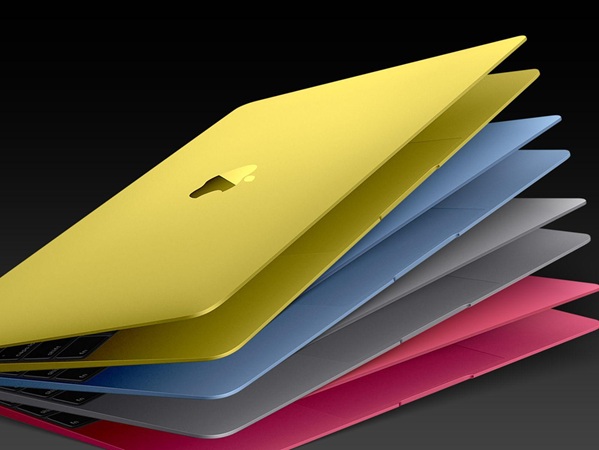
Apple’s MacBook Neo is one of the most interesting shifts in their lineup in years.
For the first time, Apple has released a true budget MacBook — but they’ve done it in a very different way:
👉 Instead of using their usual Mac chips (M1, M2, M3)
👉 They’ve used iPhone technology
So the real question is:
👉 Is the MacBook Neo actually better value than an older MacBook?
The MacBook Neo is:
- Apple’s cheapest ever laptop (~£599)
- Powered by the A18 Pro chip (same class as iPhone chips)
- Designed for:
- Students
- Casual users
- First-time Mac buyers
Key specs:
- 6-core CPU / 5-core GPU
- 8GB RAM (fixed)
- ~16-hour battery life
👉 In simple terms:
It’s basically an iPhone-powered laptop running macOS
Why Apple Built It This Way
This is the key thing most people miss.
Apple didn’t make the Neo to replace MacBooks.
👉 They made it to:
- Compete with Chromebooks & cheap Windows laptops
- Pull in low-budget buyers
- Expand the ecosystem
And that’s where the comparison gets interesting…
Neo vs Older MacBooks (M1 / M2): The Reality
1. Performance: This Is the Big One
MacBook Neo
- Optimised for:
- Browsing
- Emails
- Docs
- Streaming
- “Perfect for everyday tasks”
Older MacBook (M1 / M2)
- Built for:
- Real multitasking
- Creative apps
- Development
- Heavy workflows
👉 Key difference:
- Neo = phone-level architecture stretched to laptop use
- M1/M2 = desktop-class chips built for laptops
Even reviews highlight:
- Neo is fine for light work
- But not suitable for serious creative tasks
2. Price Comparison (Where It Gets Interesting)
Machine | Typical Price (UK) | What You Get |
MacBook Neo | ~£599 | Entry-level, limited performance |
Refurb M1 MacBook Air | ~£500–£700 | Full Mac performance |
Refurb M2 MacBook Air | ~£700–£900 | Near-modern performance |
👉 This is the key insight:
A refurbished M1 often costs the SAME as a Neo — but is significantly more powerful
3. Real-World Usage Comparison
Everyday Use (Most People)
Task | Neo | Older MacBook |
Browsing | ✅ | ✅ |
Netflix / YouTube | ✅ | ✅ |
Office / Docs | ✅ | ✅ |
👉 No real difference
Moderate Use
Task | Neo | Older MacBook |
Photoshop | ⚠️ Limited | ✅ Smooth |
Coding | ⚠️ Basic | ✅ Strong |
Multitasking | ⚠️ Can struggle | ✅ Comfortable |
Heavy Use
Task | Neo | Older MacBook |
Video editing | ❌ Not suitable | ✅ |
Music production | ❌ | ✅ |
Large workflows | ❌ | ✅ |
4. Where the Neo Cuts Corners
To hit that low price, Apple removed quite a lot:
- Only 8GB RAM (no upgrade path)
- Fewer ports & limited connectivity
- Lower-tier speakers & features
- No M-series chip (biggest limitation)
👉 This is not a “cheap MacBook Air”
👉 It’s a different class of machine entirely
The Tech.trade Insight (This Is What Matters)
This is where your positioning is strong.
The Neo looks like value… but:
👉 It’s only good value if:
- You are a very light user
- You will never push the machine
Older MacBooks (Refurb) win because:
- More power for the same price
- Longer usable lifespan
- Better resale value
- No “performance ceiling” issues
👉 As one analysis puts it:
If you need more than basic tasks, a refurbished MacBook Air offers significantly more capability
So Who Should Actually Buy the MacBook Neo?
Buy the Neo if:
- You just want:
- Internet
- Emails
- Basic apps
- You want the cheapest possible Mac
Buy an Older MacBook if:
- You want:
- Performance headroom
- Longevity
- Real productivity
👉 This is where Tech.trade customers sit
Final Verdict
- Best budget option: MacBook Neo
- Best value option: Older MacBook (M1 / M2)
- Best real-world choice: Older MacBook
The Bottom Line
The MacBook Neo is a clever product.
But it’s not a replacement for a real MacBook.
👉 It’s a gateway device.
For most buyers, especially those spending £500–£800:
👉 A refurbished MacBook from Tech.trade delivers far more performance for the same money